← All lessons
📖

Pro vocabulary glossary

Every camera word from the lessons, explained the plain way — plus example photos and a short clip so you can actually see what each one means.

59 words

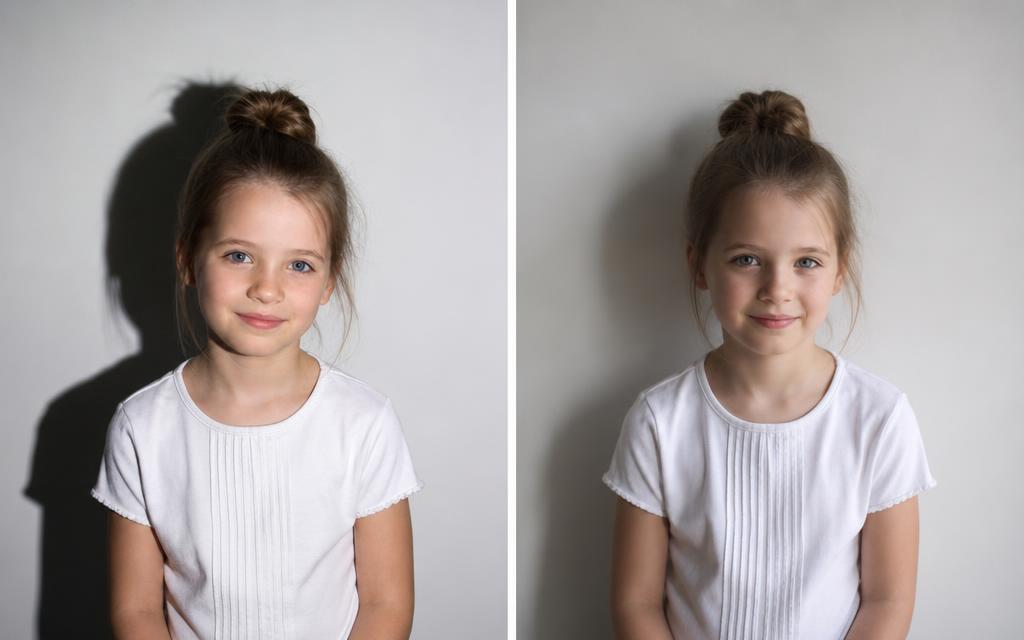
Two portraits of the same girl: left with a sharp hard shadow on the wall, right with a soft faded shadow
Lighting

Hard light

Light from a small, bright source. It draws shadows with crisp, clearly defined edges.

Example: Noon sun or a phone flash straight at someone's face.

Left = hard light (sharp shadow). Right = soft light (fuzzy shadow).

See it in the lesson →
Lighting

Soft light

Light from a big source. Shadows fade out gradually. It flatters faces.

Example: A cloudy sky, or a window with a thin curtain over it.

See it in the lesson →
Lighting

Key light

The main light — the brightest one doing most of the work on your subject.

Example: One desk lamp placed slightly off to the side of your subject's face.

See it in the lesson →
Lighting

Fill light

A dimmer light on the opposite side that fills in the dark half so it isn't pitch black.

Example: A white sheet of paper bouncing the key light back onto the shadow side.

See it in the lesson →
Lighting

Back light

A light behind your subject. It puts a glowing outline on their hair so they don't blend into the wall.

Example: A small lamp on a shelf behind the person you're filming.

See it in the lesson →
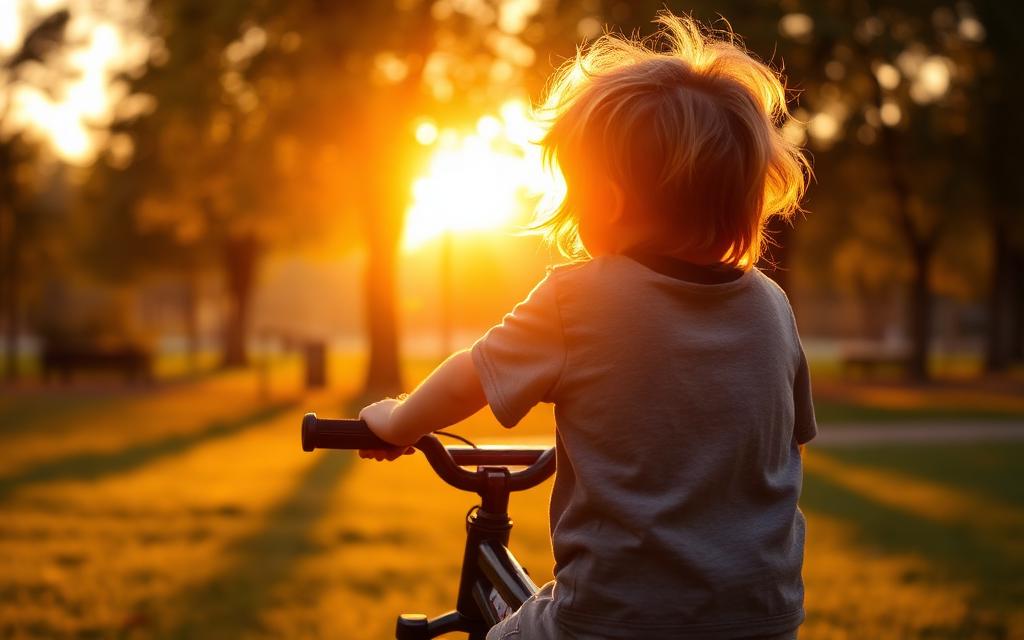
Cyclist at sunset with warm orange light glowing through their hair
Lighting

Golden hour

The hour right after sunrise or right before sunset, when the sun is low and turns everything warm and orange.

Example: A walk at sunset — hair glows and shadows stretch out long.

Golden hour: low sun, warm color, glowing edges.

See it in the lesson →
Lighting

Exposure

How bright or dark the whole picture is. Too much and it's white mush; too little and it's a dark cave.

Example: Tapping your phone screen and sliding the little sun icon up or down.

See it in the lesson →
Angles

Eye level

Camera at the same height as your subject's eyes. Feels normal, fair, and honest.

Example: Crouching to your dog's eye height instead of shooting from standing.

See it in the lesson →
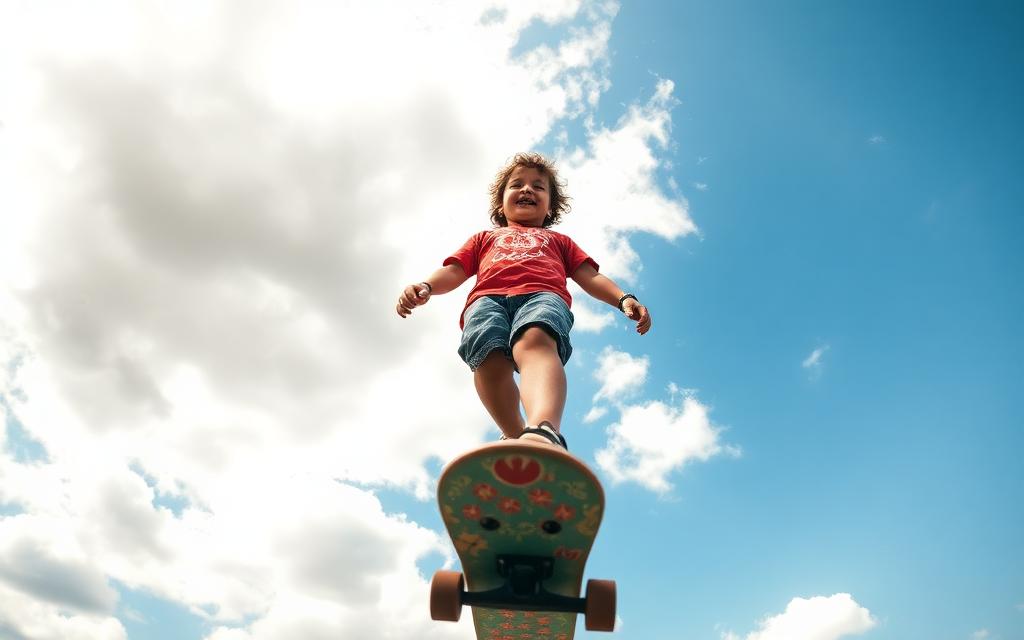
Skateboarder photographed from the ground looking up against a big blue sky
Angles

Low angle

Camera below your subject, pointing up. Makes them look tall, strong, and heroic.

Example: Setting the camera on the ground as a skater rolls past.

Shot from the ground up — instantly heroic.

See it in the lesson →
Angles

High angle

Camera above, pointing down. Makes your subject look smaller, softer, or more vulnerable.

Example: Shooting down at someone working at a low table.

See it in the lesson →
Angles

Bird's-eye view

Straight down from above, like a bird flying over.

Example: The classic flat-lay photo of a meal on a table.

See it in the lesson →
Angles

Wide shot

Shows the whole place so we know where the story is happening.

Example: The whole street scene before you cut in to one person.

See it in the lesson →
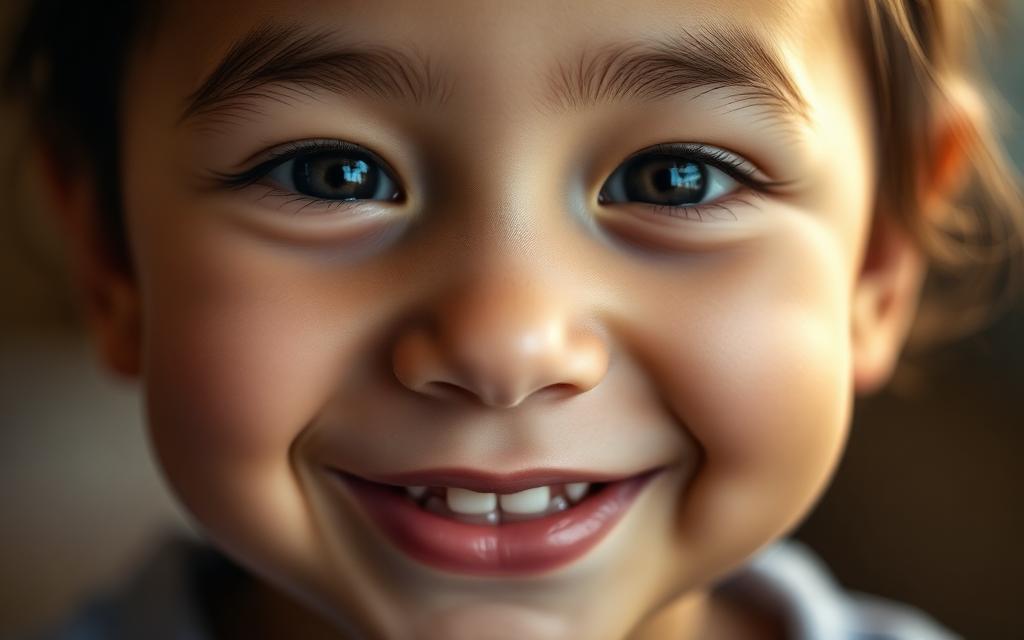
Very tight close-up of a smiling face filling the whole frame
Angles

Close-up

Fills the frame with one thing — usually a face — so we feel the emotion.

Example: Just the eyes and hands of someone opening a letter.

Nothing else in the frame — we only feel the feeling.

See it in the lesson →
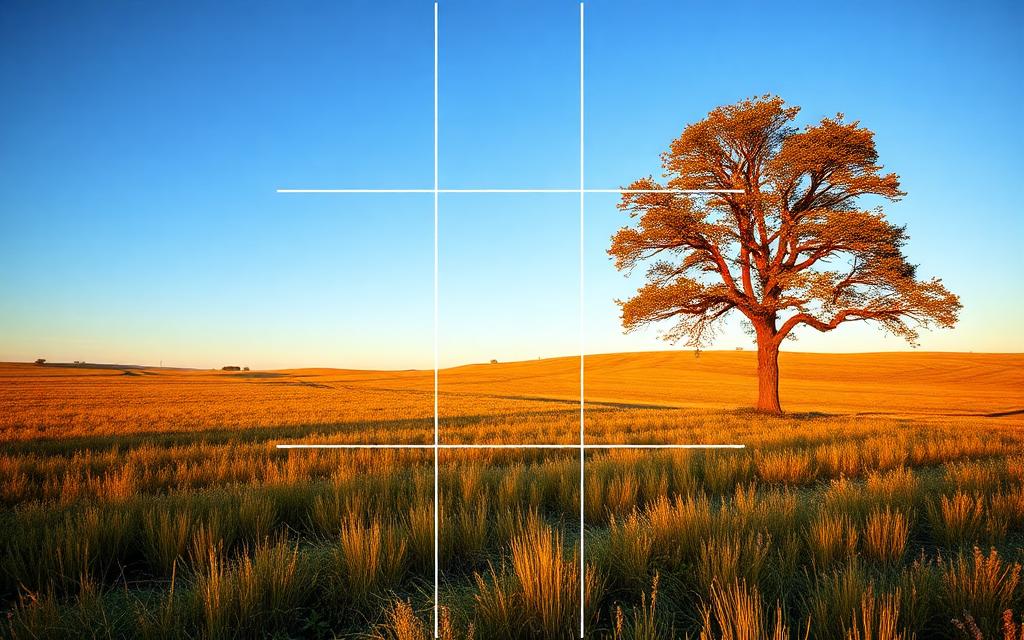
Field and tree with a 3 by 3 grid drawn on top, tree sitting on the right grid line
Angles

Rule of thirds

Imagine a tic-tac-toe grid on your screen. Put the important stuff on a line, not smack in the middle.

Example: Placing a tree on the right grid line and the horizon on the bottom line.

Tree on the line, horizon on the line — feels balanced.

See it in the lesson →
Angles

Leading lines

Lines in the picture that point toward your subject. Eyes follow lines.

Example: A sidewalk, fence, or long shadow aiming right at your subject.

See it in the lesson →
Photo editing

Crop

Trimming the edges off a photo so the good part gets more room.

Example: Cutting a parked car out of the corner of your park photo.

See it in the lesson →
Photo editing

Contrast

The gap between the darkest darks and the brightest brights. A little more makes photos pop.

Example: Too much contrast turns a face into black blobs and white blobs.

See it in the lesson →
Photo editing

Highlights & shadows

Highlights are the bright parts, shadows are the dark parts. You can fix each one on its own.

Example: Sky looks blank white? Pull highlights down. Face too dark? Pull shadows up.

See it in the lesson →
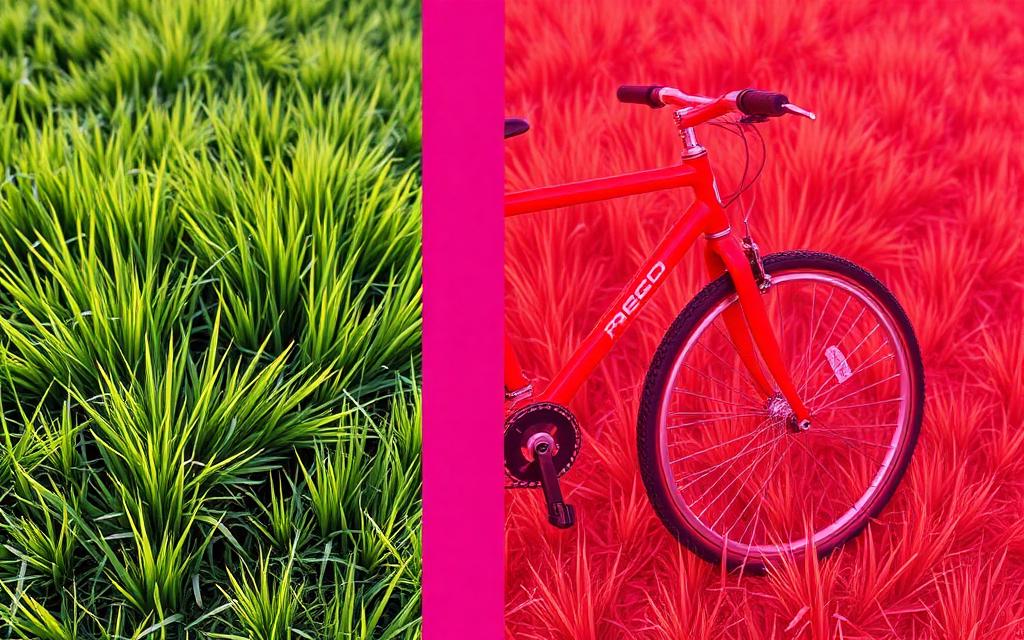
Side by side grass and bicycle, left in natural colors, right in extremely oversaturated neon colors
Photo editing

Saturation

How strong the colors are. A tiny bump helps; a big bump looks fake.

Example: Grass that glows like a highlighter means you went too far.

Left is normal. Right is way too much saturation.

See it in the lesson →
Photo editing

White balance

The warm-or-cool mood of the colors — orange and cozy, or blue and chilly.

Example: Photos indoors often look too orange until you cool the white balance down.

See it in the lesson →
Photo editing

Sharpening

Making edges crisper. A small amount helps; too much looks crunchy.

Example: Weird glowing outlines around hair = too much sharpening.

See it in the lesson →
Video editing

Timeline

The strip in your editing app where clips sit in order, left to right.

Example: Dragging your best clip to the front so it plays first.

See it in the lesson →
Video editing

Rough cut

The first messy version of your edit. Every real movie starts as one — it's supposed to be ugly.

Example: All your clips in story order with the boring bits still attached.

See it in the lesson →
Video editing

B-roll

Extra footage of hands, objects, and scenery. You lay it on top to hide cuts or show what someone is talking about.

Example: Someone says 'I love my camera' — you show a shot of the lens turning.

A 5-second b-roll detail clip: hands, lens, gentle camera move.

See it in the lesson →
Video editing

Jump cut

When you cut out the middle of a shot and the picture visibly jumps. B-roll or a new angle hides it.

Example: Snipping out 'ummm…' from the middle of a sentence.

See it in the lesson →
Video editing

Color grade

Adjusting colors at the very end so all your clips match and the whole video has one mood.

Example: Making every clip a bit warmer so the day feels sunny all the way through.

See it in the lesson →
Camera & lenses

Aperture

The adjustable opening in a lens. Wide open (small f-number) lets in more light and blurs the background.

Example: f/1.8 for a soft-background portrait.

See it in the lesson →
Camera & lenses

Shutter speed

How long the sensor is exposed to light. Fast freezes motion, slow blurs it.

Example: 1/1000 to freeze a jumping skater.

See it in the lesson →
Camera & lenses

ISO

How strongly the camera amplifies the light it captured. Higher helps in the dark but adds grain.

Example: ISO 3200 in a dim restaurant.

See it in the lesson →
Camera & lenses

Focal length

How wide or zoomed-in a lens sees, measured in millimeters.

Example: 24mm for a room, 85mm for a face.

See it in the lesson →
Camera & lenses

Prime lens

A lens with one fixed focal length. Usually sharper and better in low light than a zoom.

Example: A 50mm f/1.8 'nifty fifty'.

See it in the lesson →
Camera & lenses

Full-frame vs APS-C

Two common sensor sizes. Bigger sensors gather more light and blur backgrounds more easily.

Example: Full-frame handles a dark concert better.

See it in the lesson →
Camera & lenses

Depth of field

How much of the photo, front to back, looks sharp.

Example: Shallow depth of field: eyes sharp, ears already soft.

See it in the lesson →
Camera & lenses

Bokeh

The look of the out-of-focus areas, especially round highlights.

Example: Glowing circles from string lights behind a subject.

See it in the lesson →
Camera & lenses

Stabilization

Technology that cancels small shakes so handheld shots stay steady.

Example: Walking video that doesn't bounce.

See it in the lesson →
Camera & lenses

Neutral-density filter

Dark glass in front of the lens so you can use slow shutters in bright light.

Example: Silky waterfall blur at noon.

See it in the lesson →
Camera & lenses

Long exposure

A slow shutter that records motion as smooth blur or light trails.

Example: Car headlights turned into red ribbons.

See it in the lesson →
Photo editing

Noise

Grainy speckles that show up when ISO is pushed high or shadows are lifted hard.

Example: Rough texture in a night sky.

See it in the lesson →
Photo editing

RAW

An unprocessed file holding all the sensor data, giving far more editing room than JPEG.

Example: Rescuing a too-dark sky after the fact.

See it in the lesson →
Photo editing

Histogram

A graph of how dark and bright pixels are spread across the photo.

Example: A spike on the right means blown highlights.

See it in the lesson →
Photo editing

Dodge & burn

Selectively brightening (dodge) or darkening (burn) small areas to shape attention.

Example: Brightening the eyes, darkening a bright corner.

See it in the lesson →
Photo editing

Curves

A precise contrast and color tool where you bend a line to move tones.

Example: An S-curve for punchier contrast.

See it in the lesson →
Photo editing

Non-destructive editing

Editing with layers or instructions so the original file is never changed.

Example: Turning off an adjustment months later.

See it in the lesson →
Video editing

Frame rate

How many frames per second you record. 24fps feels cinematic, 60fps enables slow motion.

Example: Shooting 120fps to slow a splash down.

See it in the lesson →
Video editing

Codec

The method used to compress video. H.264 saves space; ProRes edits smoothly.

Example: Exporting H.264 for the web.

See it in the lesson →
Video editing

Proxy

A small stand-in copy of footage that plays smoothly while you edit.

Example: Editing 4K on a laptop without stutter.

See it in the lesson →
Video editing

Log footage

Flat, washed-out video recorded to keep maximum color-grading room.

Example: Grey-looking clips that grade beautifully.

See it in the lesson →
Video editing

LUT

A preset that maps one set of colors to another, often used to convert or style log footage.

Example: A film-look LUT applied to a whole timeline.

See it in the lesson →
Video editing

J-cut / L-cut

Letting audio start before or continue after the picture cut, so edits feel smooth.

Example: Hearing the next speaker before you see them.

See it in the lesson →
Video editing

Match cut

Cutting between two shots that share shape or motion, linking them visually.

Example: A spinning wheel cutting to a spinning fan.

See it in the lesson →
Video editing

Gimbal

A motorized mount that smooths out camera movement while you walk.

Example: Gliding down a hallway with no bounce.

See it in the lesson →
Sound

Lavalier mic

A tiny clip-on microphone worn on clothing for consistent dialogue.

Example: Interview audio that stays even when the head turns.

See it in the lesson →
Sound

Shotgun mic

A directional microphone that picks up what it's pointed at and rejects the sides.

Example: Boomed just above frame at an interview.

See it in the lesson →
Sound

Room tone

30 seconds of the space's natural quiet, recorded to patch gaps in the edit.

Example: Filling silence so cuts don't sound dead.

See it in the lesson →
Sound

Clipping

Audio recorded too loud, causing harsh distortion that can't be repaired.

Example: A shouted word turning into a crackle.

See it in the lesson →
Business

Usage license

Permission for a client to use your work in defined ways, for a defined time.

Example: One year of social media use only.

See it in the lesson →
Business

Model release

Written consent to use a recognizable person's likeness in commercial work.

Example: Signed before an ad shoot.

See it in the lesson →
Business

Deliverables

Exactly what the client receives: how many files, what format, by when.

Example: 30 edited photos plus a 60-second cut.

See it in the lesson →
Business

Call sheet

A one-page plan listing times, locations, contacts, and gear for a shoot day.

Example: Emailed to everyone the night before.

See it in the lesson →